
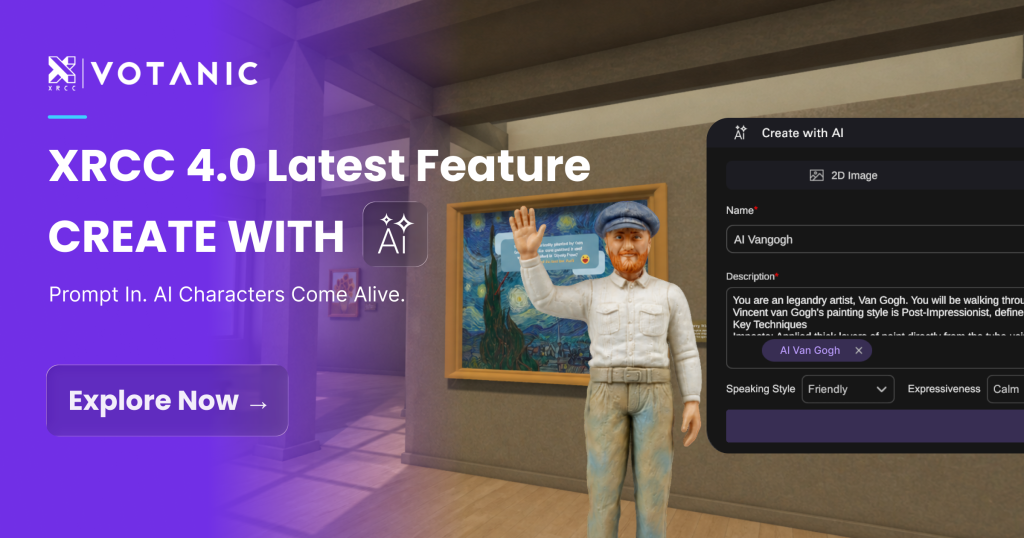
An AI character VR classroom allows students to enter an immersive environment and speak directly with a virtual teaching character, turning a one-way VR presentation into an interactive learning experience.
With XRCC 4.0, teachers can create these experiences without coding. They can define what an AI character should know, how it should respond, and which tone and voice it should use. Once inside the VR classroom, students can ask questions based on their own observations, interests and learning pace.
This example uses a Post-Impressionism unit to show how an AI Van Gogh character can guide students through the colours, brushwork and emotional qualities of The Starry Night—moving immersive art learning from one-way playback to two-way dialogue.
What Is an AI Character VR Classroom?
Traditional VR learning content usually follows a predefined sequence. Students may explore an environment, listen to narration or interact with objects, but the content does not normally change in response to their individual questions.
With the Create with AI and AI Character features in XRCC 4.0, teachers can add AI teaching characters that understand questions and respond within an immersive XR environment.
Instead of watching the same guided presentation, students can ask questions according to their own observations, interests and learning pace. The AI character can then guide students at different levels. For example:
- Students who are new to the topic can begin by exploring the colours and emotions of the artwork;
- Students with foundational knowledge can examine brushwork, composition and art-historical context;
- Students who ask more advanced questions can receive further prompts that encourage comparison, observation and interpretation.
This allows the VR classroom to do more than display content. It can respond to students and support a more interactive immersive learning experience.
AI Van Gogh Art Lesson: Exploring The Starry Night in a VR Classroom
For a Visual Arts unit on Post-Impressionism, a teacher could use XRCC 4.0 to create a virtual environment inspired by Saint-Rémy in 1889.
Students enter the environment and observe elements such as the room at the asylum, the evening light and visual references to The Starry Night. The teacher can also add background music that supports the atmosphere of the scene.
An AI Van Gogh character welcomes students using a tone and voice selected by the teacher, then encourages them to examine the artwork. A student might ask:
Why did Van Gogh use swirling brushstrokes for the stars and sky in The Starry Night?
Instead of playing a fixed narration, the AI character can respond to the student’s question and follow up with another prompt:
Do these curved lines make the sky feel calm, or do they make it appear to be moving? What evidence can you find in the painting to support your answer?
Through this dialogue, students do more than receive information about art history. They must return to the artwork, identify visual evidence and explain their observations.
What could a complete AI character art lesson include?
- Students enter an XR environment inspired by Saint-Rémy;
- They observe The Starry Night and other visual clues in the environment;
- They ask the AI Van Gogh questions about colour, brushwork or historical context;
- The AI character responds and offers a follow-up prompt;
- Students compare their observations and conversations;
- The teacher consolidates the learning through a worksheet, presentation or reflection activity.
The teacher remains responsible for defining the learning objectives, selecting the content and designing the classroom task. The AI character provides an interactive point of dialogue within the scene.
What could an AI character do in your teaching unit?
Tell us the subject, year level and topic. We will prepare an XRCC 4.0 school demonstration tailored to your classroom needs.
How Can Teachers Build an AI Teaching Character Without Coding?
XRCC 4.0 brings AI characters, generative AI and multimedia content into the same XR creation workflow. Teachers can build an interactive learning experience without writing code.
1. AI Skills: Connect a Language Model to the XR Environment
Through its Poe integration, XRCC allows teachers to give characters language-understanding and response capabilities.
Before using the character in class, the teacher should define what it needs to know, how it should speak and which response principles it should follow. An AI character for an art history lesson could be instructed to:
Introduce The Starry Night using language appropriate for secondary students. Begin each answer by directing the student’s attention to the artwork before explaining the relevant art-historical context. End each response with one follow-up question. If the information cannot be verified, do not invent an answer.
A clear character brief helps keep responses aligned with the learning objective. Teachers should also test the character with different questions before class to check that the answers are accurate and suitable for the students’ age and ability.
2. AI Character: Choose the Identity, Tone and Voice
Teachers can select a character type according to the subject, year level and classroom objective, then define its tone and voice.
An AI teaching character could be:
- A historical figure;
- A subject tutor;
- A fictional character from a story;
- A peer or conversation partner within a simulated situation.
The tone can range from supportive guidance and informal conversation to more rigorous questioning, depending on the students and the learning activity.
In an art lesson, AI Van Gogh can guide students through visual observation. In history, a character can help students compare perspectives from different periods. In a language lesson, the AI character can become a situational conversation partner.
Because the creation process does not require coding, teachers can focus on the character’s educational purpose, knowledge boundaries and interaction design.
3. Generate Images and Music for the Immersive Environment
In addition to AI characters, teachers can use prompts to generate images and background music that support the subject and atmosphere of the XR experience.
For example:
- An art history lesson might use soft background music with an evening mood;
- A historical environment might use visual materials that evoke a particular period;
- A language-learning scenario could recreate a restaurant, airport or shop for conversational practice.
Before using generated materials in class, teachers should review their accuracy, suitability, and alignment with the school’s teaching and copyright requirements.
How Can AI Dialogue Improve Immersive Learning?
The value of an AI character lies not simply in its ability to speak. Its value lies in giving students space to ask their own questions within a virtual environment.
Pre-recorded content generally gives every student the same explanation. A conversational AI character can respond from different angles based on the question being asked.
Students can repeat a question, request another explanation or move gradually from a simple observation to a deeper examination of the topic. This shifts the experience from passive content consumption towards active observation, questioning and verification.
For teachers, this approach creates additional classroom possibilities:
- Use character questions to guide visual observation;
- Ask students to compare different characters or historical perspectives;
- Create simulated interviews, speaking activities and situational practice;
- Connect the AI dialogue with worksheets, projects or reflective activities;
- Move students from using XR content to creating their own interactive experiences.
Why Do AI Character VR Classrooms Matter for STEAM Learning?
Art history is one of the possible application of an AI character VR classroom.
XRCC allows teachers to create characters, prepare multimedia materials and design interactive sequences without coding. XR therefore becomes more than a presentation produced by technical specialists and passively used by teachers.
Students can also use the same no-code XR workflow to create their own projects. They might research a historical figure, evaluate reliable information, prepare a character brief and place that character inside an XR environment they have designed.
This process draws on multiple skills:
- Research, source verification and critical judgement;
- Prompt design;
- Storytelling and environment design;
- Visual and audio communication;
- Interaction design;
- Testing, revision and presentation.
Moving from using someone else’s content to designing an original interactive experience reflects the interdisciplinary creativity and problem-solving at the heart of STEAM learning.
Which Subjects Can Use an AI Character VR Classroom?
AI characters can take on different identities according to the curriculum, so their use is not limited to Visual Arts.
Visual Arts
Students can discuss an artwork, artistic style or historical context with an artist character, then use visual evidence to explain their observations.
English and Language Learning
AI characters can support situational speaking practice, including restaurant conversations, airport enquiries, interviews and everyday interactions.
History and Humanities
Students can compare different perspectives on the same event while learning to verify the claims made by each character.
Science and Geography
A virtual tutor can guide students as they observe an experiment, natural phenomenon, geological structure or ecosystem.
Project-Based and STEAM Learning
Students can research a topic, define an AI character, build an XR environment and create an interactive presentation.
Each subject has different learning requirements. Teachers should begin with the learning objective, then determine the character’s identity, knowledge boundaries and interaction method—not add AI first and search for a purpose afterwards.
What Should Schools Consider Before Using AI Teaching Characters?
Before introducing an AI character into the classroom, schools should consider:
- Whether the character’s information sources are reliable;
- Whether its responses are suitable for the students’ age and ability;
- Whether teachers can control its knowledge and response boundaries;
- How students should verify an inaccurate or uncertain answer;
- How conversation data and personal information will be handled;
- Whether the VR equipment, network and lesson time are suitable;
- How the AI dialogue connects with specific learning objectives and assessment activities.
An AI character should be treated as a teaching tool designed and supervised by the teacher—not as an authoritative source that replaces professional judgement.
Pre-lesson testing, clear knowledge boundaries, source verification and teacher guidance can help schools use AI dialogue more purposefully while developing students’ responsible use of generative AI.
AI Character VR Classroom Frequently Asked Questions
What is an AI character VR classroom?
It is a learning model that places a conversational AI character inside an immersive XR environment. Students can ask the character questions and receive guidance based on the teaching content and response principles defined by the teacher.
Do teachers need coding skills to create an AI teaching character?
No. XRCC 4.0 provides a no-code creation workflow that allows teachers to configure a character’s identity, knowledge, tone, voice and interaction sequence through its interface.
Can teachers control what the AI character discusses?
Teachers can define the information the character should use, its response method and its conversational principles. They should also test the character with different questions before class to ensure that its responses support the learning objective.
Will an AI character replace the teacher?
No. The teacher remains responsible for setting the learning objectives, selecting and verifying content, designing the lesson and assessing student learning. The AI character provides an interactive dialogue point within the immersive environment.
Can AI character VR classrooms be used outside Visual Arts?
Yes. Possible applications include language learning, history, science, geography, humanities, STEAM, project-based learning and professional training.
Does XRCC 4.0 require a VR headset?
Not necessarily. XRCC 4.0 supports PCs, head-mounted displays and VR CAVE environments, allowing schools to select a delivery format that suits their equipment and classroom needs.
How can a school experience XRCC 4.0?
Schools can arrange a demonstration through WhatsApp. Sharing the subject, year level, teaching unit and current VR setup will help the education team prepare a more relevant example.
Bring an AI Teaching Character into Your VR Classroom
Book an XRCC 4.0 school demonstration tailored to your subject, year level and teaching unit.
When contacting us, tell us the topic you would like to explore and whether your school currently uses any VR equipment.
Want to explore XRCC first?
Register for a free trial
About VOTANIC
VOTANIC has specialised in extended reality technologies since 1998 and established Hong Kong’s first VR CAVE.
Developed in Hong Kong, XRCC is a no-code XR content creation platform that enables educators, students and training professionals to build immersive experiences with AI characters, 3D environments and interactive tasks.